Come configurare il parental control per tuo figlio teenager su WhatsApp
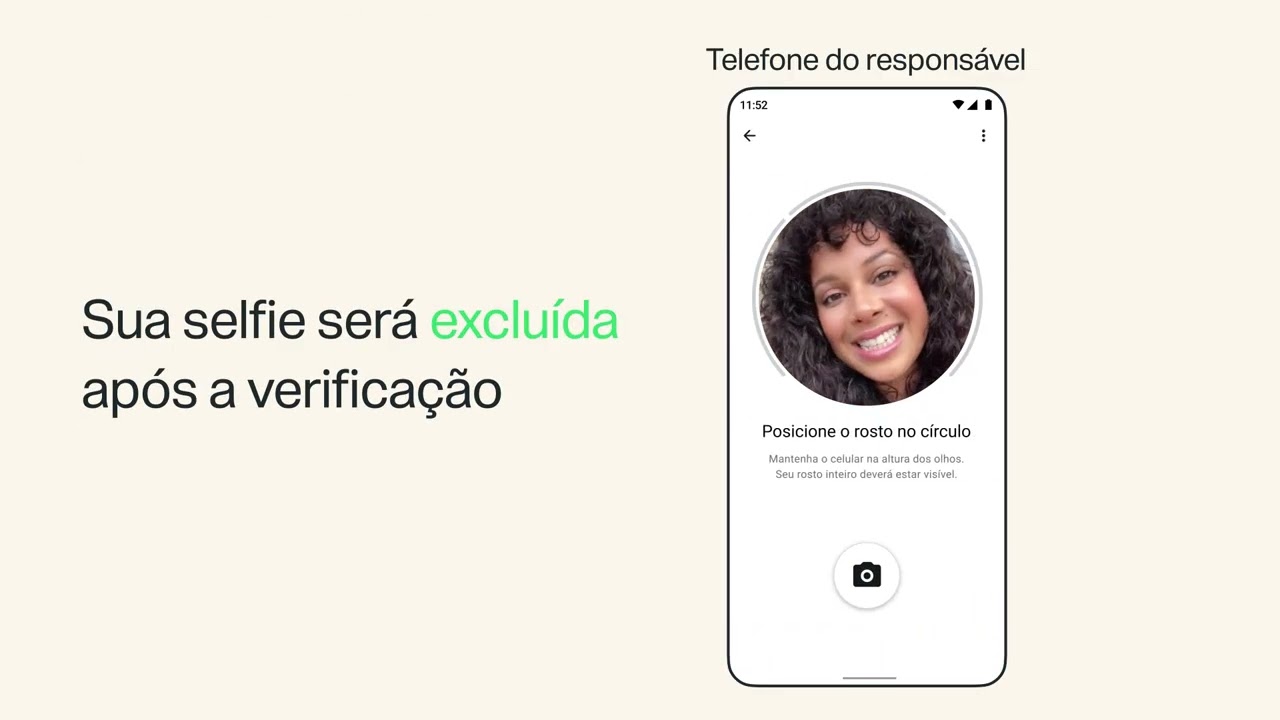
Scopri come configurare il parental control su WhatsApp per l'account di tuo figlio teenager. Il parental control ti permette di collegarti all'account di tuo figlio per controllare le sue impostazioni sulla privacy e scegliere come può utilizzare certe funzioni.Per configurare il parental control, accedi alle impostazioni WhatsApp di tuo figlio e tocca Parental control. Conferma la data di nascita e l'età di tuo figlio. Quindi scansiona il codice QR con il tuo telefono per collegare il suo account, esegui la verifica della tua maggiore età con un selfie e crea un PIN genitore. Concludi la configurazione inserendo il PIN genitore sul telefono di tuo figlio quindi controlla o modifica le sue impostazioni sulla privacy e le autorizzazioni sulle funzioni. Dopo aver collegato gli account, puoi ricevere notifiche sulle attività, scegliere le impostazioni sulla privacy e gestire la sua esperienza decidendo come può utilizzare certe funzioni come stato, canali e Meta AI.
Per scoprire come configurare il parental control per teenager su WhatsApp, visita https://faq.whatsapp.com/1761199628372670
Per saperne di più sul parental control per i teenager su WhatsApp, visita https://faq.whatsapp.com/1343233450663117
Per saperne di più su come controllare gli avvisi sulle attività per i teenager con il parental control, visita https://faq.whatsapp.com/1056875583669333
Per guardare altri video di #WhatsAppItaliano, iscriviti al nostro canale YouTube: https://www.youtube.com/user/WhatsAppInc
Resta in contatto con WhatsApp
Metti "Mi piace" a WhatsApp su Facebook: https://www.facebook.com/WhatsApp
Segui WhatsApp su Instagram: https://www.instagram.com/whatsapp
Segui WhatsApp su X: https://X.com/whatsapp
#WhatsApp #Messaggi #Privacy #ParentalControl #PrivacyWhatsApp #SicurezzaTeenager #SicurezzaOnline #SuggerimentiGenitori Receive SMS online on sms24.me
TubeReader video aggregator is a website that collects and organizes online videos from the YouTube source. Video aggregation is done for different purposes, and TubeReader take different approaches to achieve their purpose.
Our try to collect videos of high quality or interest for visitors to view; the collection may be made by editors or may be based on community votes.
Another method is to base the collection on those videos most viewed, either at the aggregator site or at various popular video hosting sites.
TubeReader site exists to allow users to collect their own sets of videos, for personal use as well as for browsing and viewing by others; TubeReader can develop online communities around video sharing.
Our site allow users to create a personalized video playlist, for personal use as well as for browsing and viewing by others.
@YouTubeReaderBot allows you to subscribe to Youtube channels.
By using @YouTubeReaderBot Bot you agree with YouTube Terms of Service.
Use the @YouTubeReaderBot telegram bot to be the first to be notified when new videos are released on your favorite channels.
Look for new videos or channels and share them with your friends.
You can start using our bot from this video, subscribe now to Come configurare il parental control per tuo figlio teenager su WhatsApp
What is YouTube?
YouTube is a free video sharing website that makes it easy to watch online videos. You can even create and upload your own videos to share with others. Originally created in 2005, YouTube is now one of the most popular sites on the Web, with visitors watching around 6 billion hours of video every month.