Tentang kontrol orang tua untuk remaja di WhatsApp
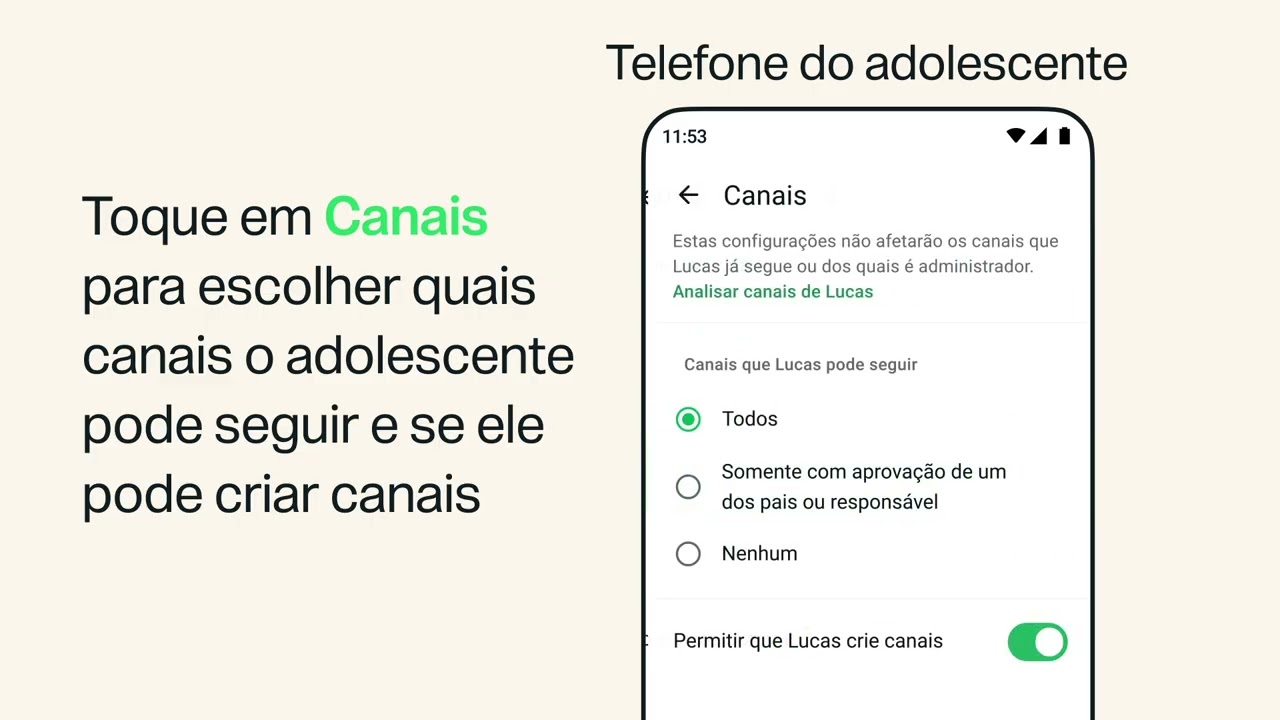
Pelajari tentang kontrol orang tua untuk remaja di WhatsApp. Kontrol orang tua adalah alat opsional untuk membantu Anda memandu pengalaman WhatsApp dari anak remaja.Untuk mulai menggunakan kontrol orang tua untuk anak remaja Anda, buka tab profil anak remaja Anda, ketuk Kontrol orang tua, lalu masukkan tanggal lahir anak remaja Anda untuk menghubungkannya ke akunnya. Setelah penyiapan, PIN orang tua diperlukan untuk mengakses Kontrol orang tua. Dari sana, Anda dapat menyesuaikan pengaturan privasi anak remaja Anda, memilih cara mereka menggunakan fitur-fitur opsional seperti Meta AI, Status, dan Saluran. Anda juga dapat melihat aktivitas mereka, misalnya saat mereka menambahkan kontak baru atau saat mereka bergabung dengan grup baru. Ingatlah untuk berbicara dengan anak remaja Anda mengenai aktivitasnya.
Untuk mempelajari selengkapnya tentang fitur kontrol orang tua untuk remaja di WhatsApp, kunjungi https://faq.whatsapp.com/1343233450663117
Untuk mempelajari selengkapnya tentang PIN orang tua untuk akun yang dilengkapi dengan fitur kontrol orang tua di WhatsApp, kunjungi https://faq.whatsapp.com/1278453430774865
Untuk mempelajari cara mengatur kontrol orang tua di WhatsApp, kunjungi https://faq.whatsapp.com/1761199628372670
Untuk #WhatsAppTips lainnya, silakan berlangganan ke saluran YouTube kami: https://www.youtube.com/user/WhatsAppInc
Bab:
0:00 Menyiapkan kontrol orang tua
0:41 Menyesuaikan pengaturan privasi
1:06 Fitur opsional
1:36 Meninjau aktivitas
2:05 Notifikasi
2:22 Komunikasi
2:37 Tips WhatsApp Lainnya
Tetap terhubung dengan WhatsApp
Sukai WhatsApp di Facebook: https://www.facebook.com/WhatsApp
Ikuti WhatsApp di Instagram: https://www.instagram.com/whatsapp
Ikuti WhatsApp di X: https://X.com/whatsapp
#WhatsApp #PengirimanPesan #Privasi #KontrolOrangTua #PrivasiWhatsApp Receive SMS online on sms24.me
TubeReader video aggregator is a website that collects and organizes online videos from the YouTube source. Video aggregation is done for different purposes, and TubeReader take different approaches to achieve their purpose.
Our try to collect videos of high quality or interest for visitors to view; the collection may be made by editors or may be based on community votes.
Another method is to base the collection on those videos most viewed, either at the aggregator site or at various popular video hosting sites.
TubeReader site exists to allow users to collect their own sets of videos, for personal use as well as for browsing and viewing by others; TubeReader can develop online communities around video sharing.
Our site allow users to create a personalized video playlist, for personal use as well as for browsing and viewing by others.
@YouTubeReaderBot allows you to subscribe to Youtube channels.
By using @YouTubeReaderBot Bot you agree with YouTube Terms of Service.
Use the @YouTubeReaderBot telegram bot to be the first to be notified when new videos are released on your favorite channels.
Look for new videos or channels and share them with your friends.
You can start using our bot from this video, subscribe now to Tentang kontrol orang tua untuk remaja di WhatsApp
What is YouTube?
YouTube is a free video sharing website that makes it easy to watch online videos. You can even create and upload your own videos to share with others. Originally created in 2005, YouTube is now one of the most popular sites on the Web, with visitors watching around 6 billion hours of video every month.