WhatsApp پر نوعمر بچوں کیلئے والدین کے کنٹرولز کا تعارف
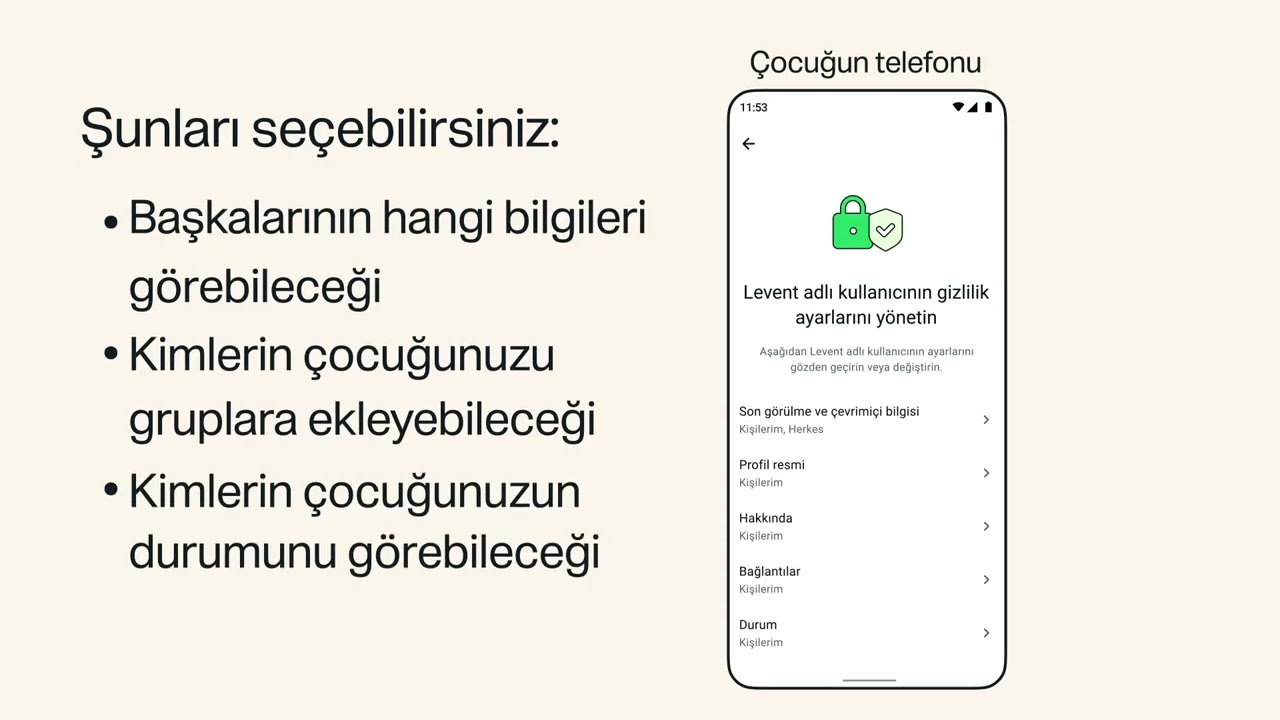
WhatsApp پر نوعمر بچوں کیلئے والدین کے کنٹرولز کے بارے میں جانیں۔ والدین کے کنٹرولز اختیاری ٹولز ہیں جن سے آپ کو اپنے نوعمر بچے کے WhatsApp تجربے کی رہنمائی کرنے میں مدد ملتی ہے۔اپنے نوعمر کیلئے والدین کے کنٹرولز استعمال کرنا شروع کرنے کیلئے، اپنے نوعمر بچے کے پروفائل ٹیب پر جائیں، والدین کے کنٹرولز پر ٹیپ کریں، اور اپنے نوعمر بچے کی سالگرہ درج کر کے اسے ان کے اکاؤنٹ سے لنک کریں۔ سیٹ اپ کے بعد والدین کے کنٹرولز تک رسائی حاصل کرنے کیلئے والدین کا پن درکار ہوگا۔ وہاں سے آپ اپنے نوعمر بچے کی پرائیویسی سیٹنگز کو ایڈجسٹ کر سکتے ہیں، یہ انتخاب کر سکتے ہیں کہ وہ Meta AI، سٹیٹس اور چینلز جیسے اختیاری فیچرز کا استعمال کس طرح کر سکتے ہیں۔ آپ ان کی سرگرمی کا بھی جائزہ لے سکتے ہیں جیسے جب وہ کوئی نیا رابطہ شامل کرتے ہیں یا جب وہ کسی نئے گروپ میں شامل ہوتے ہیں۔ اپنے نوعمر بچے سے اس کی سرگرمی کے بارے میں ضرور بات کریں۔
WhatsApp پر والدین کے کنٹرولز کے بارے میں مزید جاننے کیلئے https://faq.whatsapp.com/1343233450663117 پر وزٹ کریں
WhatsApp پر والدین کے کنٹرولز والے اکاؤنٹس کیلئے والدین کے پن کے بارے میں مزید جاننے کیلئے https://faq.whatsapp.com/1278453430774865 پر وزٹ کریں
WhatsApp پر والدین کے کنٹرولز سیٹ اپ کرنے کے طریقے کے بارے میں جاننے کیلئے https://faq.whatsapp.com/1761199628372670 پر وزٹ کریں
مزید #WhatsApp تجاویز کیلئے، ہمارے YouTube چینل کو سبسکرائب کریں: https://www.youtube.com/user/WhatsAppInc
چیپٹرز:
0:00 والدین کے کنٹرولز سیٹ اپ کریں
0:41 پرائیویسی سیٹنگز ایڈجسٹ کریں
1:06 اختیاری فیچرز
1:36 سرگرمی کا جائزہ لیں
2:05 نوٹیفیکیشنز
2:22 کمیونیکیشن
2:37 WhatsApp کے متعلق مزید تجاویز
WhatsApp کے ذریعے جڑے رہیں
Facebook پر WhatsApp کو لائک کریں: https://www.facebook.com/WhatsApp
Instagram پر WhatsApp کو فالو کریں: https://www.instagram.com/whatsapp
X پر WhatsApp کو فالو کریں: https://X.com/whatsapp
#WhatsApp #Messaging #Privacy #ParentalControls #WhatsAppPrivacy Receive SMS online on sms24.me
TubeReader video aggregator is a website that collects and organizes online videos from the YouTube source. Video aggregation is done for different purposes, and TubeReader take different approaches to achieve their purpose.
Our try to collect videos of high quality or interest for visitors to view; the collection may be made by editors or may be based on community votes.
Another method is to base the collection on those videos most viewed, either at the aggregator site or at various popular video hosting sites.
TubeReader site exists to allow users to collect their own sets of videos, for personal use as well as for browsing and viewing by others; TubeReader can develop online communities around video sharing.
Our site allow users to create a personalized video playlist, for personal use as well as for browsing and viewing by others.
@YouTubeReaderBot allows you to subscribe to Youtube channels.
By using @YouTubeReaderBot Bot you agree with YouTube Terms of Service.
Use the @YouTubeReaderBot telegram bot to be the first to be notified when new videos are released on your favorite channels.
Look for new videos or channels and share them with your friends.
You can start using our bot from this video, subscribe now to WhatsApp پر نوعمر بچوں کیلئے والدین کے کنٹرولز کا تعارف
What is YouTube?
YouTube is a free video sharing website that makes it easy to watch online videos. You can even create and upload your own videos to share with others. Originally created in 2005, YouTube is now one of the most popular sites on the Web, with visitors watching around 6 billion hours of video every month.